STEP 3: Disk Identification
note
The purpose of this task is to record pertinent information from the physical block device such as:
- Block Device Serial Number (if available)
- Partition Table Details
- File System Type
- Use
lsblkto list the serial number (and additionally the filesystem types):lsblk -afpo +SERIAL /dev/<DEVICE>
- Use
mmstat,lsblk, andpartedto cross analyze the block device’s partition table and filesystem types:sudo mmstat /dev/<DEVICE>
sudo lsblk -f /dev/<DEVICE>
sudo parted /dev/<DEVICE> print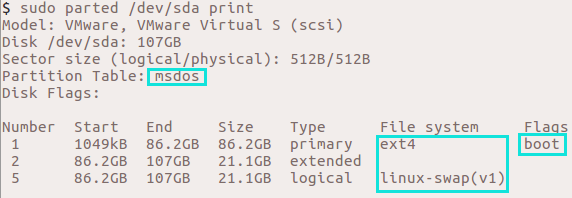
- Use
fdiskon DOS partition table block devices to identify each partition’s START SECTOR (orgdiskfor GPT partition table block devices):sudo fdisk -l /dev/<DEVICE>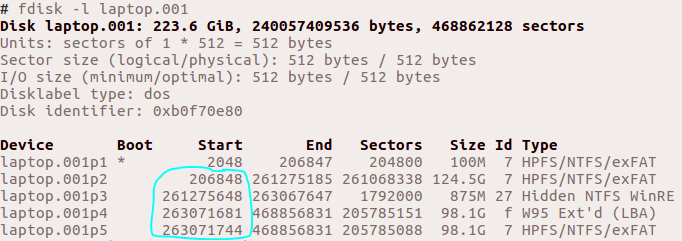
sudo gdisk -l /dev/<DEVICE>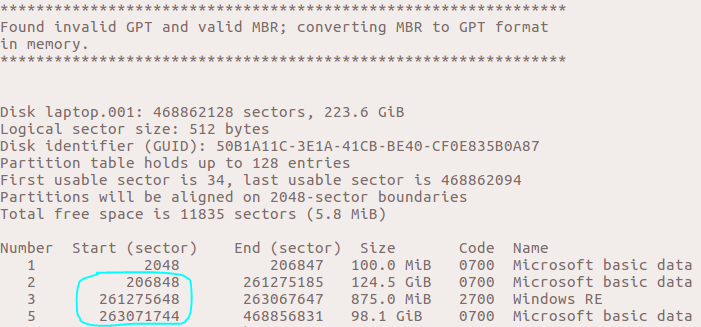 tip
tipIf available,
mmlsmay also be used to list the partitions of either GPT or legacy DOS partition tables.sudo mmls /dev/<DEVICE>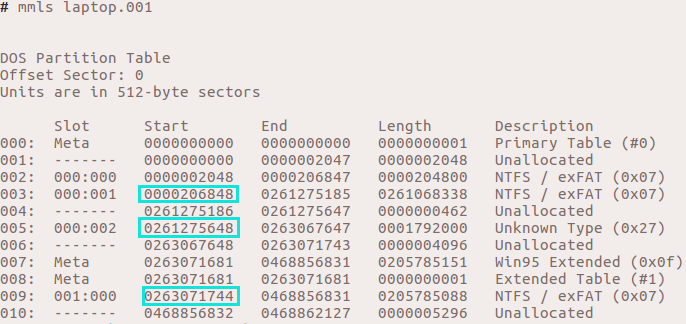
- You should now have the following information:
- Block Device Serial Number (if available)
- Number of partitions
- START SECTOR for each partition
- File system types